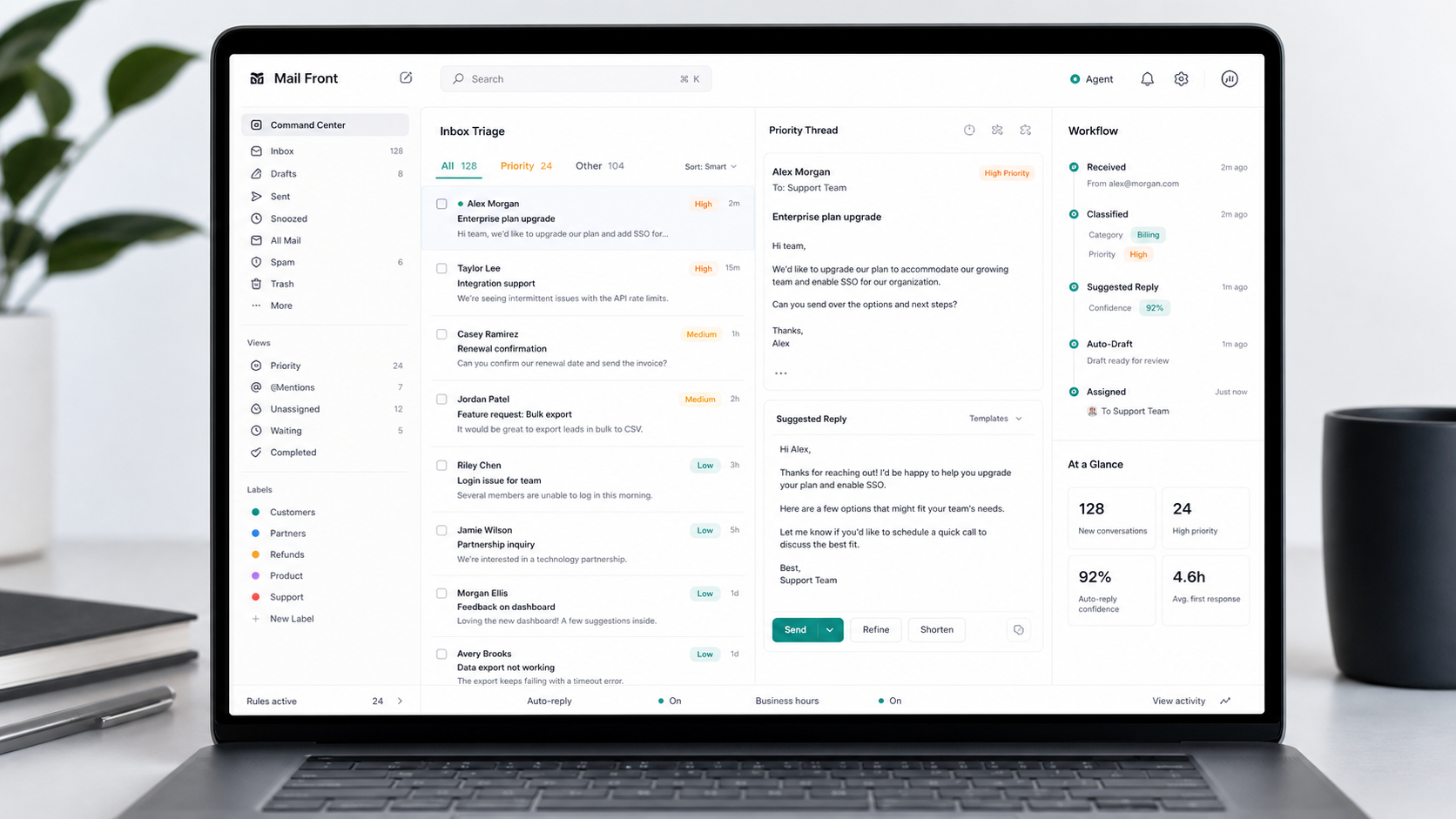
Use MailFront with a dedicated address likemail-agent@formationxyz.com.
or an existing inbox address you already use. It fields, screens, and immediately answers messages from approved knowledge, follows your brand voice, and CCs a human when needed.
Brand voiceTone, facts, offers, and boundaries set by your team
Escalation pathRoute by topic, risk, confidence, sender, or missing source
Audit trailQuestion, sources, reply, CC decision, send state
Business metricsVolume, answer rates, escalations, gaps, patterns
Reply decisionReady to send
Source matchedTone approvedCC rule checked
MailFront sends the reply only when the answer matches approved knowledge, the tone fits your rules, and the escalation path is clear.
Use cases
Email threads and replies, just like any other email conversation.
Search frontline email
↩★↗⋯
Always-on customer supportSubject: I cannot log in
Inbound sales screeningSubject: Do you support enterprise plans?
Onboarding and setupSubject: How do we connect our inbox?
Customer email -> instant MailFront reply
Always-on customer support
MailFront replies to support emails automatically and quickly,
using approved answers and copying a human only when needed.
Support inbox
new
Incoming emailSubject: I cannot log in
Hi, can you help me reset my account access?
Thread contextCustomer has reset twice this month
Reply from MailFront
12s
Sent emailSubject: Re: I cannot log in
Hi, here are the approved reset steps. If your account is locked, I have copied support so they can unlock it for you.
Inbound question -> instant factual reply
Inbound sales screening
MailFront answers factual sales questions in the same thread and
copies sales only when the conversation needs a person.
Sales inbox
new
Incoming emailSubject: Do you support enterprise plans?
Hi, we are comparing options for a 200-person team.
SignalTeam size and buying intent detected
Reply from MailFront
18s
Sent emailSubject: Re: Do you support enterprise plans?
Hi, yes. MailFront supports enterprise teams, including SSO and data-retention options. For a 200-person rollout, the next useful details are your inbox volume and required response boundaries.
On Tuesday, Alex wrote:
MailFront answered the first buying questions before sales joined the thread.
Member question -> instant useful reply
Community Engagement
MailFront answers member questions directly by email, keeping the
conversation in the inbox people already use.
Member inbox
new
Incoming emailSubject: What should I know this week?
Hi, can you send me the latest member briefing and relevant introductions?
SignalBriefing plus two introduction matches
Reply from MailFront
22s
Sent emailSubject: Re: What should I know this week?
Hi, here are the three updates from this week, plus two relevant people to meet based on your interests. I included the context for each introduction below.
member-briefing.pngintro-notes.pdf
Inline image: weekly member briefing preview
On Friday, Riley wrote:
This made the community inbox feel alive without asking members to learn another tool.
Billing email -> clear account reply
Billing and refund questions
MailFront answers invoice, renewal, and refund questions from policy and account context.
Billing inbox
new
Incoming emailSubject: Why was I charged twice?
Hi, I see two charges this month. Can you explain what happened?
Approved sourceInvoice history and refund policy matched
Reply from MailFront
16s
Sent emailSubject: Re: Why was I charged twice?
Hi, one charge is the monthly plan and one is the added seat pack from July 8. I have attached both invoice references and copied billing if you want us to reverse the seat pack.
invoice-july.pdfseat-pack-receipt.pdf
New customer -> guided onboarding reply
Onboarding and setup
MailFront turns setup questions into precise next steps, links, and owner handoffs.
Onboarding inbox
new
Incoming emailSubject: How do we connect our inbox?
Hi, what do we need to prepare before setup?
Approved sourceSetup checklist and security notes found
Reply from MailFront
14s
Sent emailSubject: Re: How do we connect our inbox?
Hi, start with one shared inbox, one approved source folder, and your escalation rules. Here is the setup checklist. I copied your implementation owner for the permissions step.
setup-checklist.docxsecurity-notes.pdf
On Wednesday, Jordan wrote:
The agent gave our team the exact setup checklist and copied the right owner.
Renewal signal -> account reply
Renewals and account changes
MailFront handles routine account requests and brings in the owner when terms change.
Customer success inbox
new
Incoming emailSubject: Can we add 30 seats?
Hi, we want to expand before the renewal date. What changes?
SignalExpansion request before renewal
Reply from MailFront
19s
Sent emailSubject: Re: Can we add 30 seats?
Hi, yes. Adding 30 seats changes the renewal band and requires account-owner approval. I copied Maya so she can confirm pricing and timing with you.
pricing-band.pdf
Partner email -> routed response
Partners and vendors
MailFront answers standard partner questions and routes commercial or legal details.
Partner inbox
new
Incoming emailSubject: Do you have partner materials?
Hi, can you send overview text, logo files, and referral terms?
RoutingMaterials approved, terms need owner
Reply from MailFront
21s
Sent emailSubject: Re: Do you have partner materials?
Hi, here are the approved partner overview and logo links. Referral terms vary by region, so I copied partnerships to confirm the current terms.
MailFront replies with event details, eligibility, reminders, and next steps.
Events inbox
new
Incoming emailSubject: Can I still join tomorrow?
Hi, is there space at the Berlin breakfast and what should I bring?
Approved sourceCapacity, agenda, and location matched
Reply from MailFront
13s
Sent emailSubject: Re: Can I still join tomorrow?
Hi, yes, there are four seats left. The breakfast starts at 09:00 at the Berlin office. Bring ID for reception; I added the agenda and arrival details below.
venue-map.pngagenda.pdf
Inline image: venue map and agenda snapshot
Feedback email -> structured insight
Feedback and research
MailFront thanks people, asks the right follow-up, and tags insights for the team.
Feedback inbox
new
Incoming emailSubject: The dashboard is confusing
Hi, I could not find the export settings after the update.
ClassifiedProduct feedback: export settings
Reply from MailFront
17s
Sent emailSubject: Re: The dashboard is confusing
Hi, thanks for flagging this. Export settings moved under Data controls. Could you reply with the report type you were exporting? I tagged this for the product team.
annotated-screenshot.png
Inline image: annotated dashboard screenshot
Buyer questions
The questions teams ask before an agent answers their emails.
How is the knowledge base updated?
Connect approved docs, FAQs, web pages, policy notes, and prior answers. New gaps are logged so your team can approve better source material.
What happens with uncertain replies?
Set thresholds by topic and risk. MailFront can answer immediately, copy a named owner, or escalate when a reply should not be sent automatically.
Which model is under the hood?
Model choice is part of deployment. The audit view can record model, prompt version, source set, and policy version for each reply.
Does it handle real email threads?
The agent reads thread context, keeps replies in the same conversation, and treats attachments as review material when your policy allows it.
Can we see what the model used?
Each reply keeps a source trail and decision record, including why the agent answered, copied a human, or escalated.
How do pilots and pricing work?
Start with a scoped inbox, measured answer rate, escalation review, and gap report. Pricing should follow volume and risk, not seat count alone.
Set up your MailFront
Set up your MailFront today.
Pick the email address, send us your website and any documentation you want in the knowledge base, and give us a little time to process it. Then we activate your ready-to-use ask@yourdomain.com MailFront.

 Mail the Agent